 516-812-0917
 Help
Help Live Chat





 Expedited Shipping Available

Potter / Amseco PAD 100-PSDA Addressable Pull Station Single/Dual Action
-
MPN: PAD 100-PSDA
-
JMAC ID: 201875360
Potter / Amseco PAD 100-PSDA PAD 100 PULL STATION DUAL ACTION
Pulling the white "T" bar handle down is all that is necessary to start the PAD100-PSSA (Single Action). By lifting the front cover and then drawing the white "T" bar handle down, the PAD100-PSDA (Dual Action) is turned on. The "T" bar cannot be reset without removing the front cover once it has been enabled. The front cover opening will also turn on the pull station. Use the Potter WS-93 key to unlock and open the front cover in order to reset the PAD100-PS Series. Push the "T" bar back into place once the cover is open to reposition the front cover.
UPC: 785192023869
Also known as: PAD100PSDA
For more information about the Potter / Amseco PAD 100-PSDA, please contact us.
Pulling the white "T" bar handle down is all that is necessary to start the PAD100-PSSA (Single Action). By lifting the front cover and then drawing the white "T" bar handle down, the PAD100-PSDA (Dual Action) is turned on. The "T" bar cannot be reset without removing the front cover once it has been enabled. The front cover opening will also turn on the pull station. Use the Potter WS-93 key to unlock and open the front cover in order to reset the PAD100-PS Series. Push the "T" bar back into place once the cover is open to reposition the front cover.
UPC: 785192023869
Also known as: PAD100PSDA
Technical Specifications:
|
For more information about the Potter / Amseco PAD 100-PSDA, please contact us.
Other products from Potter / Amseco


Potter / Amseco
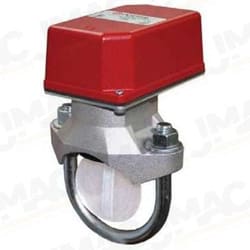
Potter Amseco VSR-5 Vane Type Waterflow Alarm Switch with Retard, 5" Pipe Size (Replaces VSR-F)
$214.00

Customer Reviews

1 Review
-
POTTER-AMSECO-PAD100PSDA
